aws-cognito
Console Commands
[!NOTE] Last Updated: 2026-09-29
The package provides a set of Laravel Artisan commands for installing, configuring, managing, and synchronizing your AWS Cognito integration.
You can use these commands to manage Cognito resources such as:
- User Pools
- App Clients
- Groups
- MFA configuration
- Local environment configuration
All commands are available through Laravel’s Artisan CLI.
Contents
AWS IAM Configuration
Additional AWS IAM permissions are required when using the install or make commands to configure SMS-based authentication.
Amazon Cognito uses an IAM role to publish SMS messages through Amazon SNS. The IAM role must be configured so that Amazon Cognito can assume it, and the IAM identity executing the Artisan command must have permission to pass the role to Cognito.
Create an IAM Role for Amazon Cognito
Create an IAM role for Amazon Cognito SMS messaging and configure its trust policy to allow the Amazon Cognito service to assume the role.
The following is an example trust policy:
{
    "Version": "2012-10-17",
    "Statement": [
        {
            "Effect": "Allow",
            "Principal": {
                "Service": "cognito-idp.amazonaws.com"
            },
            "Action": "sts:AssumeRole"
        }
    ]
}
Attach the required Amazon SNS permissions to this role based on your SMS configuration.
Grant iam:PassRole Permission
The AWS IAM user or role used to execute the install or make command must have the iam:PassRole permission for the IAM role configured for Cognito SMS messaging.
This permission allows the Artisan command to associate the IAM role with the Cognito User Pool during configuration.
For security, restrict iam:PassRole to the specific IAM role required by your Cognito configuration. Avoid granting iam:PassRole access to all IAM roles (*) unless it is explicitly required.
The following example grants permission to pass a specific Cognito IAM role:
{
    "Version": "2012-10-17",
    "Statement": [
        {
            "Effect": "Allow",
            "Action": "iam:PassRole",
            "Resource": "arn:aws:iam::<AWS_ACCOUNT_ID>:role/<COGNITO_ROLE_NAME>"
        }
    ]
}
Replace the following placeholders with your AWS account details:
<AWS_ACCOUNT_ID>— Your AWS account ID.<COGNITO_ROLE_NAME>— The name of the IAM role created for Cognito SMS messaging.
[!IMPORTANT] The
iam:PassRolepermission must be granted to the IAM user or role executing the Artisan command. It is not granted to the Cognito service role itself.
Console Commands
The following commands provide the primary CLI interface for managing the Cognito integration:
| Command | Description |
|---|---|
cognito:install |
Initialize and configure the Cognito integration. |
cognito:make |
Create supported Cognito resources. |
cognito:list |
List and inspect supported Cognito resources. |
cognito:list-config |
List and inspect the Cognito configuration. |
cognito:sync |
Synchronize configuration between AWS Cognito and the local environment. |
cognito:purge |
Remove identified Cognito resources. |
For detailed information about any command, use the Laravel Artisan --help option:
php artisan cognito:<command> --help
Artisan standard options --help, --quiet, --verbose, and --version are supported for all commands.
Installation Command
The cognito:install command initializes the AWS Cognito integration for your Laravel application.
It guides you through the initial configuration and can configure the required AWS Cognito User Pool and App Client settings.
Run the following command:
php artisan cognito:install
During installation, the command prompts you for the required Cognito configuration:
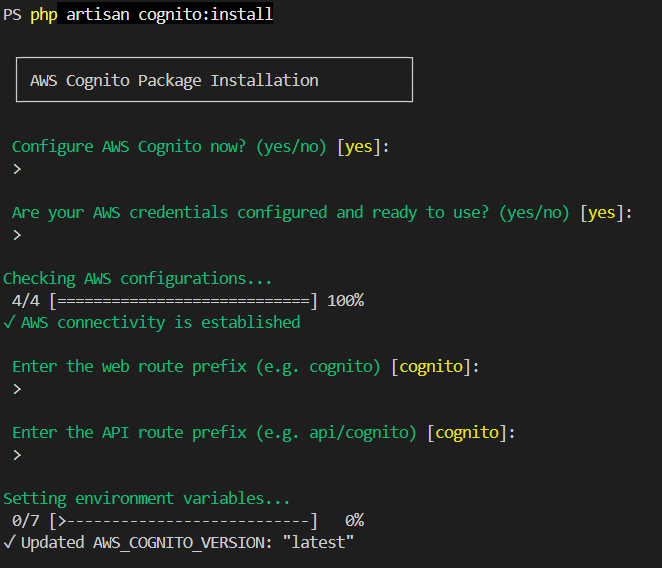
The installation process can:
- Configure the AWS Cognito User Pool.
- Configure the Cognito App Client.
- Synchronize Cognito configuration values with your application’s
.envfile. - Create the default Cognito group if it does not already exist.
- Update the local Cognito configuration based on the selected AWS resources.
After installation, review the generated .env values and ensure that they match your application’s requirements.
[!TIP] Run
php artisan cognito:install --helpto view all available installation options.
Make Command
The cognito:make command creates AWS Cognito resources from the Laravel command line.
It can be used to create resources such as:
- User Pools
- App Clients
- Groups
- Other supported Cognito resources
Example, to create a new Cognito User Pool, run:
php artisan cognito:make --pool --name=MyUserPool
The command uses the supplied name and the configured Cognito options to create the resource in AWS. It will automatically apply the necessary settings based on your configuration values. The command will prompt you for any additional required information during the creation process and also synchronize the configuration with your .env file, based on your inputs.
Additional options are available to customize the resource during creation. For example, you can specify deletion protection for the user pool by additionally using the --deletion-protection flag or provide a description for terms documents.
[!NOTE] When creating resources that require IAM roles, such as SMS-based Cognito configuration, ensure that the IAM identity executing the command has the required
iam:PassRolepermission.
List Command
The list command has two variations: cognito:list and cognito:list-config. The cognito:list command retrieves and displays information about supported AWS Cognito resources (i.e. List of User Pools, App Clients, Terms Documents, and User Pool Groups). The cognito:list-config command retrieves and displays the current Cognito configuration values (in JSON format) for the User Pool, App Client, and MFA Settings.
For example, to list the available Cognito User Pools:
php artisan cognito:list --pool
The command can also be used to retrieve information about other supported resources, including:
- User Pools
- App Clients
- Terms Documents (Terms of Use and Privacy Policy)
- User Pool Groups
Use the appropriate option to select the resource you want to list.
The output is formatted in a table by default, but you can also choose to output the results in JSON format for easier consumption by scripts or automation tools. By default, the command displays the results in a table format.
To return the results as JSON, use the --format=json option:
php artisan cognito:list --pool --format=json
To list the current Cognito configuration values for a User Pool, run:
php artisan cognito:list-config --pool
This format is useful when consuming command output from scripts, CI/CD pipelines, or other automation tools.
Sync Command
The cognito:sync command synchronizes configuration between your Laravel application and AWS Cognito. The command uses the configured Cognito User Pool and App Client to retrieve or apply configuration values. In case you want to synchronize a specific User Pool or App Client, you can provide the --pool-id and --client-id options.
The command supports synchronization in both directions:
- AWS → Local — Retrieves configuration from AWS Cognito and updates the local environment.
- Local → AWS — Applies local configuration to the AWS Cognito User Pool and App Client.
Synchronize AWS Configuration to Local
To retrieve the current Cognito configuration from AWS and update your local environment, run:
php artisan cognito:sync --aws-to-local
This operation retrieves the configuration values from the Cognito User Pool and App Client and updates the corresponding values in the .env file. If you don’t provide any pool ID or client ID, the command will use the default configured User Pool and App Client values from your .env file.
Synchronize Local Configuration to AWS
To apply the local configuration to AWS Cognito, run:
php artisan cognito:sync --local-to-aws
This operation reads the supported Cognito configuration values from the local environment and updates the corresponding User Pool and App Client settings in AWS.
[!WARNING] The
--local-to-awsoption can modify your AWS Cognito configuration. Review your local configuration before running this command, particularly when using it against a production User Pool.
Purge Command
[!WARNING] The
cognito:purgecommand permanently deletes AWS Cognito resources. Use this command with caution, especially when targeting production resources.
The cognito:purge command removes AWS Cognito resources by providing their identifiers for deletion.
It can be used to clean up resources such as:
- User Pools
- App Clients
Example, to purge a specific Cognito User Pool, run:
php artisan cognito:purge --pool
The console will prompt for confirmation before permanently deleting the specified Cognito User Pool. If the identifier is not provided, the command will list the available User Pools for selection.
The user pool with deletion protection enabled cannot be deleted with the cognito:purge command unless the deletion protection is disabled first. This ensures that critical user pools are not accidentally removed. Attempting to delete a protected user pool will result in an error message prompting you to disable deletion protection before proceeding.
Similarly, to purge a specific App Client, you can run:
php artisan cognito:purge --client
The console will prompt for confirmation before permanently deleting the specified Cognito App Client. If the identifier is not provided, the command will list the available App Clients for selection.