aws-cognito
Multi-Factor Authentication (MFA)
[!NOTE] Last Updated: 2026-10-29
This package provides the Multi-Factor Authentication (MFA) functionality using AWS Cognito. This documentation provides the necessary information to implement the MFA functionality in your Laravel application.
[!IMPORTANT] We have released the laravel blade components as a feature from V2.0.6. These view components have php/html blade code and javascript functions to handle MFA challenge verification within your application.
Contents
- Introduction
- Configurations
- Features
- Quick Start
- Advanced Topics
- References
- Key Points
Introduction
Multi-Factor Authentication (MFA) is a security feature that adds an extra layer of protection to user accounts by requiring users to provide additional verification during the login process. This package provides support for MFA using AWS Cognito, allowing developers to implement MFA in their Laravel applications.
The library currently provides the MFA for the Software Token and SMS based TOPT.
Configurations
AWS Configurations
In order to use the MFA functionality, you need to configure the AWS Cognito User Pool with the necessary settings. Enable the Multi-Factor Authentication (MFA) option.
Select your AWS Cognito User Pool and navigate to the Authentication > Sign-in.
Step 1A: First time MFA configuration
Select Overview in the left navigation and browse to the Set up MFA section on the right panel. Click on the Edit MFA link to configure the MFA settings.
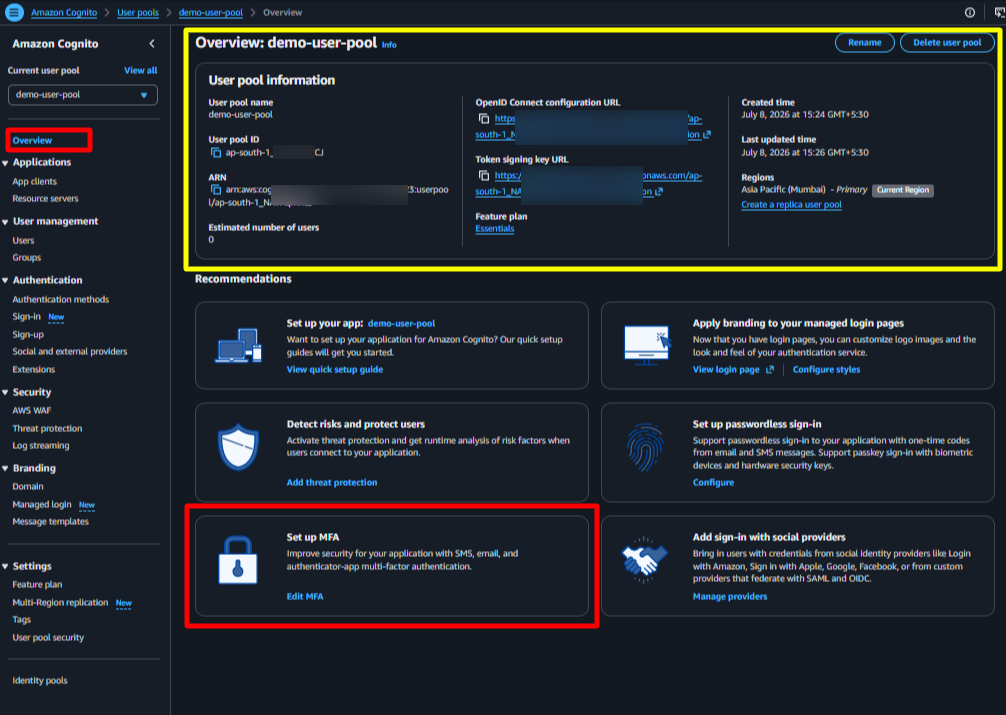
Step 1B: Amend the existing MFA configuration
If you have already configured the MFA settings, the above step 1A will not be available.
In that case, you can expand Authentication in the left navigation, and click the Sign In option. Then, browse to the Multi-Factor Authentication (MFA) section on the right panel. Click on the Edit link to configure the MFA settings, as shown below.
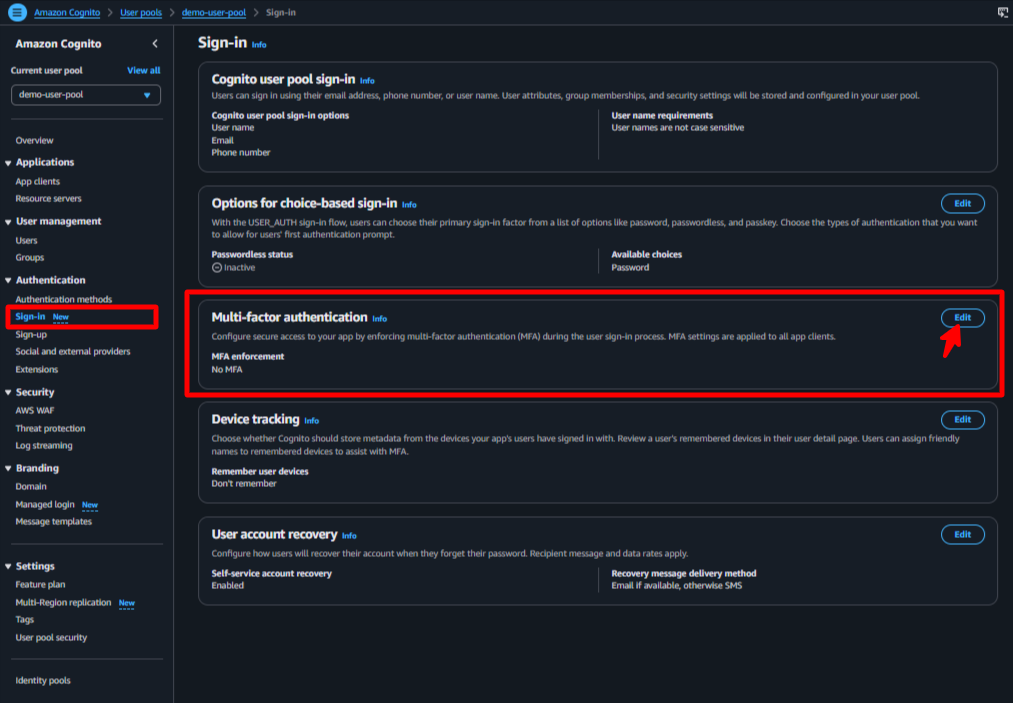
Step 2: Select the MFA enforcement and methods in the AWS Cognito User Pool
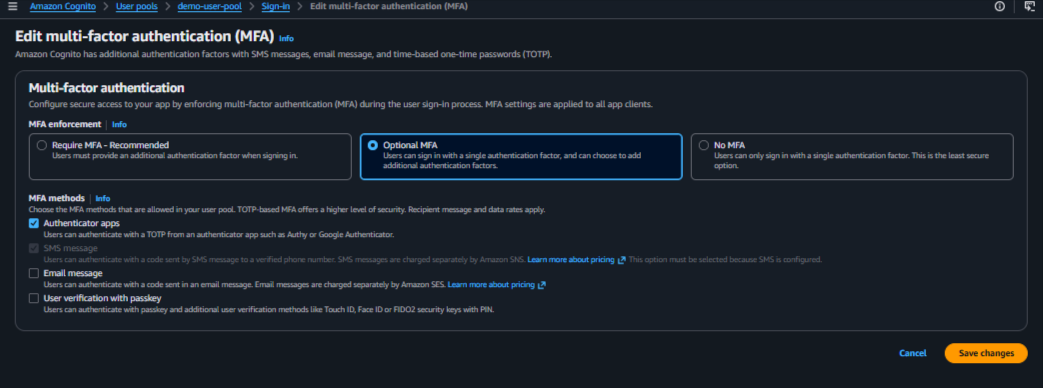
Select the desired enforcement and methods for MFA in the AWS Cognito User Pool. The available options are:
- MFA Enforcement
- Required (forces all users to set up MFA)
- Optional (allows users to choose whether to set up MFA)
- MFA Methods
- Authenticator apps for
SOFTWARE_TOKEN_MFA - SMS messages for
SMS_MFA - Email Messages for
EMAIL_MFA(not supported in this package) - User Passkeys
- Authenticator apps for
Save the changes.
Step 3: Confirmation of saved MFA settings
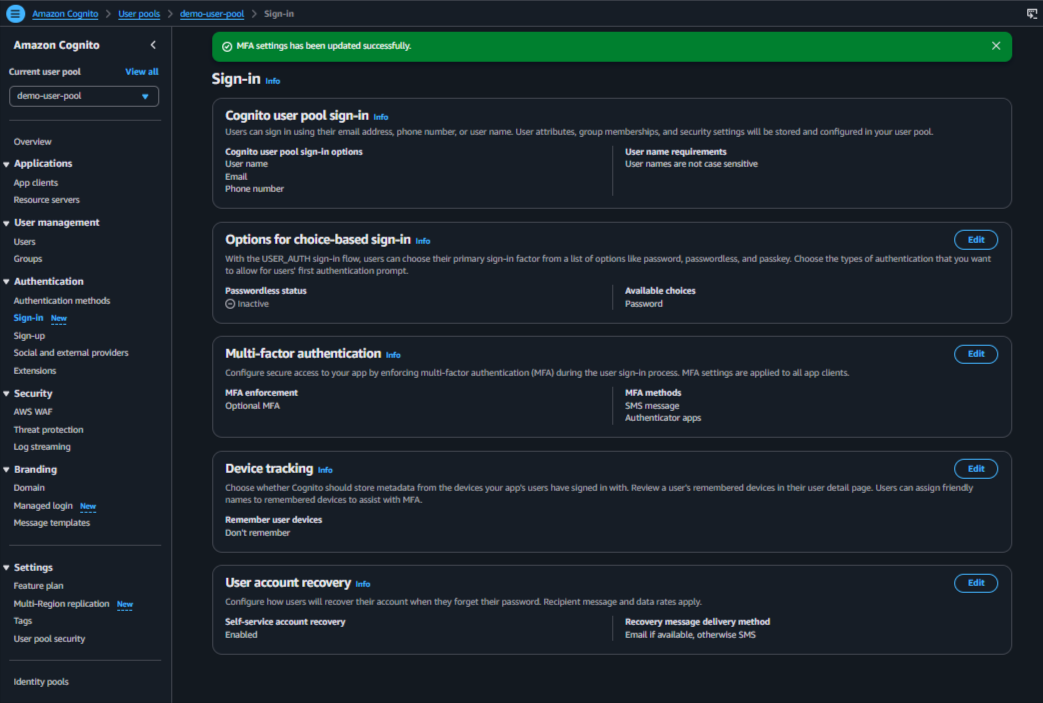
Laravel Configurations
The package provides the following environment variables to configure Multi-Factor Authentication (MFA). You can define these variables in your .env file or configure their default values in config/aws-cognito.php.
AWS_COGNITO_MFA_SETUP="ON"
AWS_COGNITO_MFA_TYPE="SOFTWARE_TOKEN_MFA"
MFA Setup
Use AWS_COGNITO_MFA_SETUP to control whether MFA is enabled, optional, or disabled.
| Value | Description |
|---|---|
OFF |
Disables MFA. This is the default value. |
OPTIONAL |
Allows users to choose whether to enable or disable MFA. |
ON |
Requires users to enable MFA. |
For example, to require MFA for all users, set the following value in your .env file:
AWS_COGNITO_MFA_SETUP="ON"
To allow users to manage their own MFA preferences, set the value to OPTIONAL.
MFA Type
Use AWS_COGNITO_MFA_TYPE to specify the supported MFA method or methods. The default value is SOFTWARE_TOKEN_MFA.
| Value | Description |
|---|---|
SOFTWARE_TOKEN_MFA |
Software token-based MFA. |
SMS_MFA |
SMS-based MFA. |
EMAIL_MFA |
Email-based MFA. |
To configure a single MFA method, set the environment variable to the desired value:
AWS_COGNITO_MFA_TYPE="SOFTWARE_TOKEN_MFA"
Supporting Multiple MFA Types
The package supports configuring multiple MFA methods using a comma-separated list. For example:
AWS_COGNITO_MFA_TYPE="SOFTWARE_TOKEN_MFA,SMS_MFA"
When multiple methods are configured, the package handles the appropriate MFA challenge based on the configuration. The first method in the list is used as the default MFA method for the user. Users can change their MFA method through their user profile settings, subject to the configured options and AWS Cognito capabilities.
Features
Blade Component (web app)
The package provides a blade component for
MFA based authenticationMFA management
The MFA based authentication component is integrated into the challenge component.
Vite Configuration
The blade component for the web application requires Vite to be properly configured to handle the necessary scripts and assets. Ensure that your Vite setup includes the appropriate configuration for handling the component’s JavaScript and CSS files. The component uses bootstrap version 5.3 with Modal support.
Add the following code to your app.js file in your project’s resources/js folder to ensure proper handling of the component’s assets:
// app.js
import './bootstrap';
import { Modal } from 'bootstrap';

window.Modal = Modal;
Building the blade component with Vite ensures that the necessary JavaScript and CSS assets are properly loaded, allowing the component to function correctly within your web application. To complete the setup, make sure to run the Vite build process using the appropriate command for your environment, such as npm run dev for development or npm run build for production.
MFA based Authentication
Use the challenge component in your challenge page to handle the MFA authentication flow. The component will handle the generation of the necessary values for the MFA proof and will send them back to the server in response to the challenge.
    <form id="auth-challenge-form" method="POST" ...>
        ...
        <!-- pass the form name provided as a parameter to the component -->
        <x-cognito::challenge
            :challenge-form-name="'auth-challenge-form'" />
        ...
        ...
        @php
            $data = (session('data')) ?? null;
            $challengeNameValue = 'NONE';

            if ($data && isset($data['status']) && $data['status'] == 'challenge') {
                $challengeNameValue = isset($data['challenge_name']) ?
                    strtoupper($data['challenge_name']) :
                    $challengeNameValue;
            } //End if
        @endphp
        ...
        ...
        <div> <!-- Shows the passcode input field for the Password/OTP/TOTP based challenges only  -->
            @stack('cognito-challenge-passcode')
        </div>
        ...
        ...
        <!-- Button with data-action and data-role attribute -->
        <button type="submit"
            data-action="challenge-submit" data-role="">
            Submit</button>
        ...
    </form>

    @stack('cognito-challenge-scripts')
    ...
Using this component will simplify the implementation of the MFA authentication functionality in your application.
The data is secure, as per the cyber security standards, and the necessary scripts and methods are provided in the component to implement the MFA feature in your application.
MFA Management
The MFA management functionality allows you to handle the activation and deactivation of the Software Token MFA for users. By including the RegisterMFA trait in your controller, you gain access to the necessary methods to manage MFA for your users.
In the web application context, the trait methods can be invoked from your controller actions to activate or deactivate the Software Token MFA for users. Typically, you would call these methods in response to user actions, such as clicking a button to enable or disable MFA in their account settings.
The API based approach is detailed in the subsequent sections of this documentation.
For the Web application context, the package exposes, view components, and necessary scripts to facilitate the MFA management process. Add it to your blade templates where you want to manage the MFA settings for the users.
For example, you might include a section in your account settings page where users can activate or deactivate the MFA for their account.
@extends(config('cognito.views.layout'))

@section('content')

<x-cognito::common.js-scripts />
<x-cognito::mfa-auth />

<div class="container">
    <div class="row justify-content-center">
        <div class="col-md-8">
            <div class="card mb-2">
                <div class="card-header">

                </div>

                <div class="card-body">
                    <h2><strong>Welcome: </strong></h2>
                </div>
            </div>

            @stack('cognito-mfa-activate-form')
        </div>
    </div>
</div>

@stack('cognito-common-scripts')
@stack('cognito-mfa-scripts')

@endsection
Activate MFA (Web Application)
Call the appropriate methods using simple html elements. With the data attributes data-role="mfa" and data-action="activate", you can trigger the MFA activation process.
<button type="button" class="dropdown-item" disabled
    data-role="mfa" data-action="activate">
    Activate MFA
</button>
This will trigger the MFA activation process from the View Component and display the necessary UI elements for the user to complete the activation. To customize the appearance or behavior, you can modify the corresponding partial view rendered by the component. The partial view cognito::partials.mfa.activate-form is typically located in the resources/views/vendor/cognito/partials/mfa/ directory of your Laravel application. You can publish the vendor views using the php artisan vendor:publish command if the views are not already present in your application.
The response from the web application will display the QR code for activating the Software MFA token as shown below:
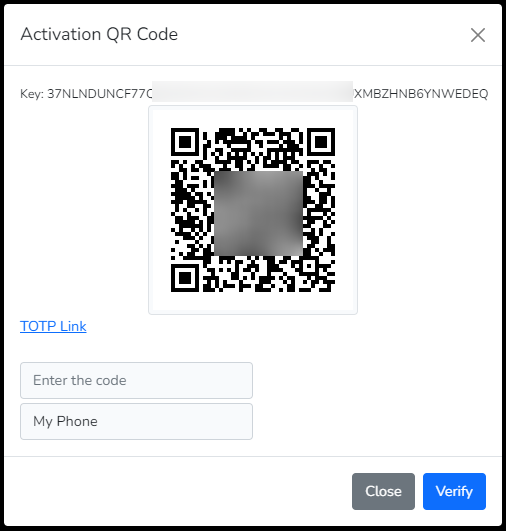
[!IMPORTANT] In case you want to change the QR Generator library, you can change the value in the configuration file with the key mfa_qr_library. Alternately, you can set the string in the environment file identified by AWS_COGNITO_MFA_QR_LIBRARY.
Verify MFA (Web Application)
To verify MFA, the user needs to respond to the activation challenge by providing the code from the authenticator application. This can be done through a form submission displayed by the web application during the activation process.
Deactivate MFA (Web Application)
To deactivate MFA, the user can trigger the deactivation process using a form or an API request with the data-role="mfa" and data-action="deactivate" attributes set. This will prompt the web application to handle the deactivation and update the user’s MFA status accordingly.
<button type="button" class="dropdown-item" disabled
    data-role="mfa" data-action="deactivate">
    Deactivate MFA
</button>
Other actions available in this data-action attribute include deactivate to deactivate MFA, enable to enable MFA, and disable to disable MFA.
API Documentation
This Laravel Package provides the necessary methods to implement MFA based authentication functionality provided by AWS Cognito. The available challenges are dynamically provided from the trait making the user experience aligned to the AWS SDK.
The package provides a trait RegisterMFA that you can add to your controller to provide custom functionality. The namespace for the trait is Ellaisys\Cognito\Auth\RegisterMFA.
Login with MFA
The login shall require two steps for complete the overall authentication using the MFA approach.
- Sign In using the username and password. This step shall generate the challenge.
- The second step involves passing the OTP/TOTP
codeagainst that challenge.
***Step 1***: Sign In using username and password
POST /login
Content-Type: application/json
Accept: application/json
{
    "username": "<username>",
    "password": "<password>"
}
In case the MFA is enabled and activated, then the response will be as shown below. This example generates the challenge for the user to respond with the code from the authenticator application.
{
    "status": "challenge",
    "challenge_name": "SOFTWARE_TOKEN_MFA",
    "session_token": "AYABeEkKMeJKkzhx3MK-GzS3ISIAH
    QABAAdTZXJ2aWNlABBDb2duaXRvVXNlclBvb2xzAA
    ...
    ...
    jVrz53Y1uJ3I30w46CpL9xlB50IbVJ0SNYY_tuFsLc
    GjYfDpn7XQcd6-fXWovCIYoMH5Q",
    "challenge_params": {
        "FRIENDLY_DEVICE_NAME": "<friendly_device_name>",
        "USER_ID_FOR_SRP": "<username>"
    },
    "username": "<username>"
}
***Step 2***: Respond to the challenge with the code from the authenticator application
POST /challenge
Content-Type: application/json
Accept: application/json
{
    "challenge_name": "SOFTWARE_TOKEN_MFA",
    "session": "<session_token_from_step_1>",
    "username": "<username>",
    "challenge_value": "<code_from_authenticator_app>"
}
Software Token MFA Functionality
The Software Token MFA functionality allows users to enable and manage MFA using a software-based authenticator application. The package provides the necessary methods to activate, verify, and deactivate the Software Token MFA for users.
Activate MFA
The activate process allows the user to configure the Software MFA. To configure the Software Token MFA setting on the mobile device, a key or the scan code (easy to consume), is available for use on any of the authenticator applications (i.e. Google Authentictor OR Microsoft Authenticator).
The process completes when the code is verified using the Verify MFA step.
The package provides the necessary methods to handle the activation of the Software Token MFA for users. Just including the trait in your controller is sufficient to access these methods.
In case, you want to modify the activation process, write your custom logic in the controller and call the activate method with the request parameter, provided in the trait. This shall activate the Software MFA token.
public function actionActivate()
{
try {
        return $this->activate($request); //Pass the request object
    } catch(Exception $e) {
        throw $e;
    } //Try-catch ends
} //Function ends
The response that you will get for the API call would look this
{
    "SecretCode": "ESKPE46WBNOAB7QXXXXXXXXXXXXXXXXXXXPFIVJVJFEPDP2NNIA",
    "SecretCodeQR": "https://chart.googleapis.com/chart?chs=200x200&cht=qr&chl=otpauth://totp/ApplicationName (john@doe.com)?secret=ESKPE46WBNOAB7QXXXXXXXXXXXXXXXXXXXPFIVJVJFEPDP2NNIA&issuer=ApplicationName&choe=UTF-8",
    "TotpUri": "otpauth://totp/ApplicationName (john@doe.com)?secret=ESKPE46WBNOAB7QXXXXXXXXXXXXXXXXXXXPFIVJVJFEPDP2NNIA&issuer=ApplicationName"
}
Verify MFA
In order to complete the activation process, the verification is an essential step. As part of this verification process, you need to enter the code (available in the authenticator application) while submitting the request. The implementation needs to be updated depending on the web or API controller. The response will be HTTP Status Code 200.
public function actionVerify(string $code)
{
try {
        return $this->verify($request, $code); //Pass the request object and the MFA code from the device
    } catch(Exception $e) {
        throw $e;
    } //Try-catch ends
} //Function ends
Deactivate MFA
In order to deactivate the MFA for the authenticated user, this endpoint can be called to deactivate the MFA. In most practical situations, you can skip this implementation, based on your application requirements. However, if you want to provide this feature, you can implement the following method in your controller.
Below curl helps deactivate the user’s MFA, returning the HTTP Success Code.
POST /user/mfa/deactivate
Content-Type: application/json
Accept: application/json
Authorization: Bearer <access_token>
Enable MFA
This feature allows the admin user to enable MFA using an email address. The developer must implement the RBAC to ensure this feature is not misused.
Below curl helps enable the MFA returning the HTTP Success Code.
POST /user/mfa/enable
Content-Type: application/json
Accept: application/json
Authorization: Bearer <access_token>
{
    "username": "<username>"
}
Disable MFA
This feature allows the admin user to disable MFA using an email address. The developer must implement the RBAC to ensure this feature is not misused.
Below curl helps disable the MFA returning the HTTP Success Code.
POST /user/mfa/disable
Content-Type: application/json
Accept: application/json
Authorization: Bearer <access_token>
{
    "username": "<username>"
}
API Routes
[!NOTE] We are releasing the API predefined routes as a new feature from V1.3.0.
php artisan vendor:publish –provider=”Ellaisys\Cognito\Providers\AwsCognitoServiceProvider” –tag=”controllers”
For the list of published routes and configurations, please refer API Routes
References
- AWS Cognito MFA
- AWS SMS Pricing You may incur additional costs to send out the SMS from AWS. Refer AWS SNS pricing for more details.